
APPLICATION NOTE NO. 79
Configuring Inductive Modem Module (IMM)
for Logic Level Serial (LLS)
September 2005
The IMM is shipped in Configuration Mode 7, ready to connect to a PC with a terminal program using RS-232.
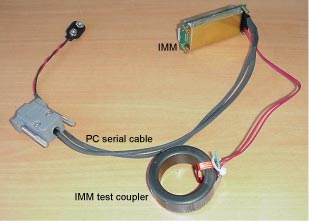 Connect
the PC serial cable and IMM Test Coupler to the IMM at J1 and J2.
Connect
the PC serial cable and IMM Test Coupler to the IMM at J1 and J2.Note:
The IMM cannot communicate with Logic Level Serial (LLS) and RS-232 at the same time. There are two ways to switch between RS-232 and LLS; either method may be used through the serial connection or through the Inductive Modem (if the IM is enabled).
- The most direct method uses the SetSerialType=0 and SetSerialType=1 commands. Type 0 is LLS, Type 1 is RS-232. These commands do not change any configuration settings except the Serial Type. The IMM prompts the user to repeat the command, and then switches to the new Serial Type immediately.
- The other method involves setting a Configuration Mode. Configuration Modes are actually shortcuts that change Configuration Data to prepare for common tasks. There are currently only seven basic interface modes, but separate numbers are assigned for the same configuration in RS-232 and in LLS.
Configuration Mode Number Description RS-232 Logic Level Serial 1 8 Hardware handshaking with simple host instrument 2 9 Serial handshaking with simple host instrument 3 10 Hardware handshaking with simple buoy controller 4 11 Serial handshaking with simple buoy controller 5 12 Hardware handshaking for symmetric communication 6 13 Serial handshaking for symmetric communication 7 (default) 14 Terminal program symmetric communication
Last modified: 23 Feb 2011
Sea-Bird Home Phone: (+1) 425-643-9866 Fax: (+1) 425-643-9954 E-mail: seabird@seabird.com
